How to Network at a Conference Without Paper Business Cards (What Actually Works in 2026)

Picture this: you’re at a conference, you’ve just had the best conversation of the day, and the other person says, “Do you have a card?” You reach into your jacket, find nothing, and that smooth moment gets awkward fast. We’ve all been there at least once.
Here’s what nobody tells you, though: the people who walked out of that same conference with the most valuable connections probably weren’t the ones handing out the most cards. They were the ones with a system. In 2026, that system doesn’t involve paper at all, and it works significantly better.
Research from ShareEcard found that professionals who exchanged contact details digitally at conferences followed up with nearly every new contact within 48 hours. Those who relied on paper cards? They lost half of them in jacket pockets and couldn’t read two of them. The method of exchange directly affects your follow-through, which means getting this right matters more than most people realize.
Here’s what actually works.
Before the Conference: Do 80% of Your Work in Advance
The professionals who seem to network effortlessly at conferences aren’t naturally gifted, they just show up prepared. The most effective conference networkers do most of their work before they even arrive.
Check the attendee and speaker list as soon as it’s available. Connect with speakers on LinkedIn before the event. Send a short connection request mentioning you’re attending and looking forward to their session. If they accept, ask one specific, thoughtful question about their topic. That single exchange means you’re no longer a stranger when you walk into the room. You’re the person they were already talking to online.
This also solves the contact-sharing problem before it arises. If you’ve already connected with someone on LinkedIn before the conference, you don’t need to exchange anything on the day. The connection is already there.
Set Up Your Digital Card Before You Leave Home
If you only do one thing differently this year, make it this: set up a free digital business card before you attend any conference, and have it ready to share in under three seconds.
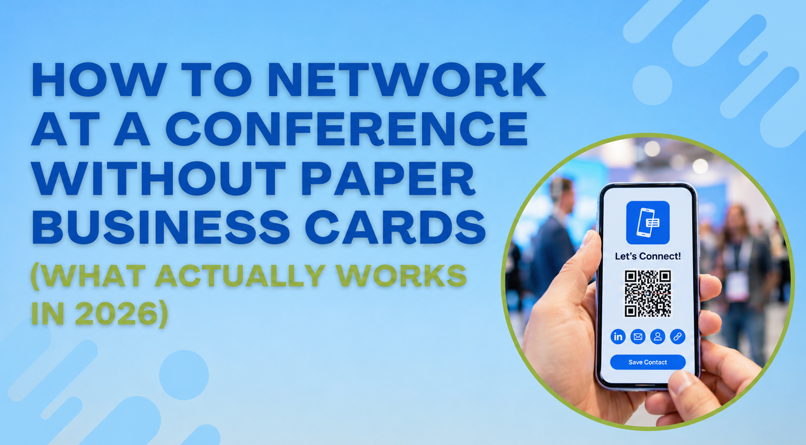
A digital card lives at a URL or behind a QR code. When someone scans it, your name, phone number, email, LinkedIn, and website open instantly on their phone no app download required on their end, no typing, and no squinting at small print. They save your details in one tap and you’re in their contacts before the conversation has even finished.
ShareEcard offers free digital business cards for small business owners with no subscription required. Set it up once, and if your job title changes or your number updates, you edit the card once, and every QR code and link you’ve ever shared automatically reflects the new information. That’s how to update business card details without reprinting. You simply don’t print in the first place.
Save your digital card QR code as your phone’s lock screen wallpaper before the conference. When someone asks for your details, hand them your phone face-down. They flip it, scan the screen, and are done. No unlocking required, no fumbling through apps.
At the Conference: The Three Exchanges That Actually Work
1. The LinkedIn QR Code Swap
For fast, in-the-moment exchanges, particularly between sessions when there are only two minutes before the next talk, LinkedIn’s built-in QR code is the fastest option available. Open the app, tap the search bar, hit the QR icon. Your code appears. They scan it, a connection request fires, and you both move on. Total time: under ten seconds.
This is especially effective for learning how to share your business card on LinkedIn in a natural, non-awkward way. It feels like a handshake, not a sales pitch.
2. The Digital Card QR Scan
For conversations where you’ve had a proper exchange and want them to have your full contact details, not just a LinkedIn connection, pull up your ShareEcard QR code. This gives them everything: phone, email, website, and your role, all saved directly to their contacts. No typing, no errors, no card that ends up in a drawer.
This is also the moment where a well-designed digital card does real work. If your profile includes a professional photo, your company logo, and a clean layout, it reinforces the impression you just made in person. First impressions happen twice at a conference, once in the conversation and once when they look you up afterward.
3. The Direct Phone Exchange
For the most valuable conversations, the ones where you genuinely want to follow up within 24 hours ask them to type their email directly into your phone while you do the same on theirs. Send them a short message right there in the conversation. Now they have your contact, you have theirs, and you’ve already initiated follow-up before you’ve even walked away.
This method works almost every time because it’s personal and immediate. The contact doesn’t get lost in a stack of other cards. It’s already in their inbox.
How to Add Your Digital Card to Your Email Signature
Most professionals send dozens of emails daily and ignore the networking opportunity at the bottom of every single one. Learning how to add your business card to your email signature takes ten minutes and works continuously without any effort on your part.
Format it simply: your name, title, phone number, and a line that reads “Connect with me” hyperlinked to your ShareEcard digital profile. Every email you send from the conference booking dinner, following up on a session, or replying to a speaker becomes a passive contact-sharing moment for anyone who receives it.
The Follow-Up Window Is 48 Hours
The most overlooked part of conference networking isn’t the exchange. It’s what happens after. Send a personalised LinkedIn message or email within 48 hours referencing something specific from your conversation. Generic “great to meet you” messages get ignored because they could have been sent to anyone.
Reference the actual conversation. “Enjoyed what you said about sustainable supply chains during the panel” does more work than “Great meeting you at the conference.” That specificity is what turns a contact into a relationship.
For the deepest connections the two or three people from any conference who could genuinely move your work forward follow up with a specific next step. A 20-minute call, a relevant article, an introduction to someone you mentioned. Something that gives them a reason to respond.
The One Physical Item Worth Having
If you want something tangible to hand over, one reusable QR code card made from metal or bamboo is the only physical item worth carrying. It links to your digital profile, never runs out, and is the most practical eco-friendly alternative to paper business cards available right now. One card lasts indefinitely regardless of how many times your contact details change behind it.
Browse free print-ready templates at ShareEcard’s design library matched by industry and style, with bleed lines already included for any printer. For a broader look at how conferences are approaching digital networking in 2026, LinkedIn’s professional networking guide covers the platform-specific tools most attendees still aren’t using fully.
See also: Why Loan Apps Are Focusing on Compliance With Speed
FAQs
How do I network at a conference without paper business cards?
Set up a free digital business card before you arrive, use LinkedIn’s QR code for fast in-the-moment exchanges, and follow up within 48 hours with a personalised message referencing your specific conversation. The method of contact exchange directly affects whether you follow through. Digital exchanges consistently outperform paper cards on this measure.
What is the fastest way to share contact information at a conference?
LinkedIn’s built-in QR code is the fastest. Open the app, tap the search bar, show the QR code, and let them scan it, and a connection request fires in under ten seconds. For full contact details including phone and email, a digital business card QR code shared from your phone lock screen is the most complete option.
Do I need an app to receive someone’s digital business card?
No. The best free digital business card platforms, including ShareEcard, are designed so the recipient needs nothing beyond a standard smartphone camera to scan a QR code and access your full contact details.
How do I update my conference contact details without reprinting cards?
With a digital card, you edit your profile once online, and every QR code and link you’ve shared automatically updates. No reprint, no waste, no explaining to new contacts that the number on your old card is wrong.